
If people talk about your brand on Instagram, their mentions are free UGC and honest customer feedback. The problem is finding them: Instagram spreads mentions across notifications, DMs, the Tagged tab, and comments.
I’ll show you how to check Instagram mentions in the app and how to track all of them automatically.
Quick answer: to see mentions on Instagram, check your Activity notifications, your DMs for Story mentions, and the Tagged tab on your profile. To catch untagged mentions too, use an Instagram social listening tool.
What are mentions on Instagram?
Mentions on Instagram happen when users include your handle (e.g., @yourbrand) in their content. This creates a direct link to your account and sends you notification, making it an effective way for you to engage with customers and monitor conversations.
‘Instagram mentions’ definition
Unlike Instagram hashtags, which categorize content broadly, mentions are direct interactions with your brand that help you understand how your audience perceives it. Also, mentions can appear in different parts of Instagram, including:
- Posts: users can mention your brand in the caption or within the image;
- Stories: mentions in Instagram Stories appear as tappable tags and notify the mentioned account via direct messages;
- Comments: users can mention your business in the comments section of their own or others’ posts, often to share recommendations or feedback;
- Bios: some users add brand mentions in their Instagram bio, used mostly to signal partnerships, send shoutouts, or express affiliations.
Tracking these mentions helps you answer customers faster, collect UGC, and spot complaints early. If you also run campaigns, monitor your Instagram hashtags alongside your mentions.
How to track Instagram mentions automatically
To track every mention without manual checks, use a social listening tool. EmbedSocial collects your Instagram mentions automatically and tracks other networks in the same dashboard:
Step 1: Create your EmbedSocial account and log in
Create your EmbedSocial account. You can start with a 7-day free trial and cancel anytime.
Step 2: Add a new Instagram mentions source
The fun part starts now: adding your Instagram mentions as a source so that EmbedSocial can pull all relevant content and analyze or display it.
To do so, click ‘Sources’ (left ribbon menu) → ‘Add new source’ (top-right corner), and then find Instagram mentions:

Note: You will first have to connect a Facebook account that’s linked to your Instagram profile.
Step 3: Find all your Instagram mentions under ‘All Posts’
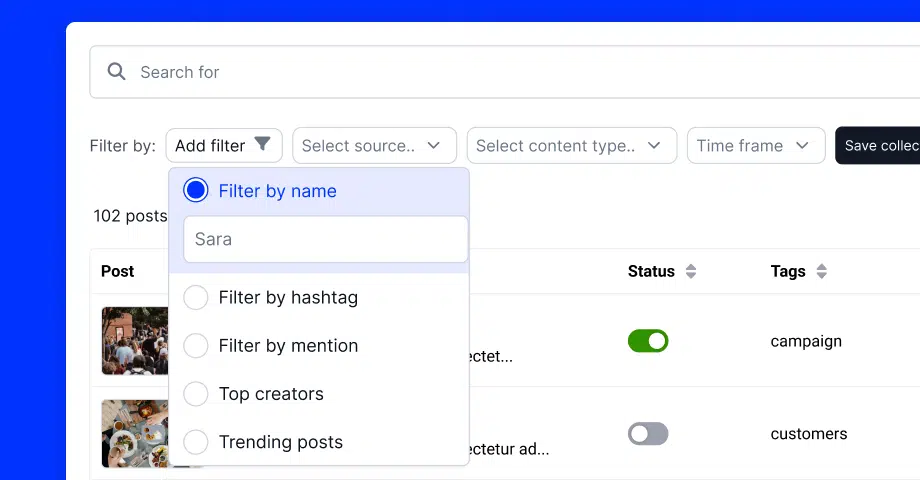
Now, tap ‘All Posts’ (top of the left ribbon menu) to get a list of all the mentions EmbedSocial has collected for you. However, you might have to tap the dropdown menu and manually select the corresponding account:

Step 4: Tag individual posts (if you need to)
At this point, you can easily isolate individual posts that might require your attention later, such as customer complaints or submissions for a contest you ran:

Step 5: Analyze your posts in Insights
Click ‘Social listening’ in the left menu, then ‘Insights’. The page loads your data automatically. Open it and the charts are already populated from the filters at the top, so there is no import step and nothing to prepare first.

Official tutorial: How to read your Social Insights charts →
Bonus step: Embed your Instagram mentions on your website!
Create an Instagram widget from your mentions, copy the embed code, and paste it into your site. The same steps work if you want to embed your Instagram feed.

How to see mentions on Instagram manually (7 free methods)
Instagram has no single mentions tab, so you need to check a few places. Here’s how to see mentions on Instagram for free:
1. Check your notifications for mentions
Instagram notifies you when someone mentions your brand in a post, comment, or story. So, regularly check your activity feed via the heart icon (top-right corner):

2. Check DMs for Story mentions
When someone mentions your brand in an Instagram Story, you’ll receive a DM. These mentions disappear after 24 hours, so it’s important to engage with them quickly:

3. Open the Tagged tab on your profile
If someone tags your brand in a post, it will appear under the “Tagged” section on your profile. However, note that this only applies to posts, not stories or comments:

4. Search your brand name in Instagram search
Although Instagram doesn’t have a dedicated mentions tracker, you can manually search for your brand name or handle in the search bar. This can help you find public posts where users mention your business but don’t tag you directly:

This is also the only native way to find hidden mentions: posts that name your brand without tagging it.
5. Save mentions to a collection
If you come across important mentions, save them to an Instagram Collection for easy access later. This helps you organize UGC, keep track of feedback, and respond when needed:

6. Check comment sections manually
Users might talk about your brand in the comments of Instagram posts, customer posts, or competitor content, without tagging you. For that reason, you should make it a habit to check relevant comment sections to catch these indirect mentions.
7. Check your mentions settings
If you can’t see Story mentions or tags, check who’s allowed to mention you. Go to Settings and activity → Tags and mentions, and set “Who can @mention you” to Everyone. If it’s set to People you follow or No one, you’ll miss most brand mentions.

These methods work for occasional checks. They don’t catch every untagged mention, and Story mentions disappear after 24 hours. For daily tracking, use the automated method above.
Best practices for leveraging Instagram mentions
Tracking Instagram mentions is only the first step. You also have to engage with them to make a huge difference in building relationships and strengthening your brand. Here are the best ways to make the most of your mentions:
- Engage with users who mention your brand: reply to comments, reshare tagged posts, and thank people for positive mentions.
- Encourage more mentions and UGC: run hashtag contests, offer incentives, or ask customers to tag you. Browse these user-generated content examples for ideas.
- Respond to negative mentions quickly: address complaints professionally to show you care.
- Track trends in your mentions: look for common themes and use AI sentiment analysis to see how customers feel.
- Use mentions as social proof: feature real customer posts on your website, social media, and emails.
How do brands & businesses benefit from IG mentions?
Instagram mentions do more than notify you. Here’s what they bring your brand:

- Gathering user-generated content (UGC): customer mentions create authentic content for your social media, website, or campaigns. Before reuse, get the creator’s permission with UGC rights management.
- Gaining customer insights and feedback: mentions reveal customer opinions and expectations, helping you identify trends, measure sentiment, and refine your products or services;
- Identifying and addressing customer complaints: a social media monitoring tool helps you respond to complaints promptly, resolve issues, and turn negative experiences into positive ones;
- Enhancing brand reputation and engagement: responding to mentions shows you care and can strengthen customer relationships, encourage interactions, and improve brand loyalty;
- Boosting brand awareness and reach: mentions expose your brand to users’ followers, which can attract new customers and drive traffic to your profile or website.
Conclusion: Turn Instagram mentions into growth opportunities
Instagram mentions show you what customers think, give you UGC to reuse, and flag complaints before they grow. The in-app methods cover the basics, but they miss untagged mentions and Story mentions expire in 24 hours.
Automate your tracking so every mention lands in one place. Then apply the same workflow to TikTok mentions, Threads, and Facebook mentions.
Start your 7-day free trial and collect your first Instagram mentions today.